
Best Class Registration Software for Nonprofits


Education is an essential revenue stream and relationship builder for many arts nonprofits, and for good reason. Classes and camps offer an opportunity to attract new patrons and younger audiences, and build deeper connections and long-term loyalty with your community—not to mention future donors.
When it comes to managing these programs, organizations running just a few classes every year can often get by with a combination of forms, spreadsheets, and willpower. Any small friction points are annoying but manageable. As programs grow, however, these small frictions start to slow things waaay down, overwhelming staff and frustrating families.
Busy parents need an easy way to sign up for summer camp. Teams need to manage student information, payments, waitlists, refunds, transfers, and reporting at scale. Development and marketing teams need a complete picture of patron behavior to fundraise and promote offerings effectively.
The right class registration software for nonprofits simplifies the signup process for patrons, as well as the management process for staff, saving you hours each week so you can spend time where it counts. It should:
- Make signing up impossibly simple for participants
- Reduce manual workarounds for lean teams
- Enable staff to manage rosters, forms, waitlists, payment plans, and more
- Simplify payments, refunds, and financial reporting
- Send registration data to your other core systems (like ticketing or donor management)
- Be easy to learn, train, and maintain
In this post, we'll explore 7 key capabilities and features arts nonprofits should look for in a class registration software.
Key Feature 1: Simple class registration that embeds into your website
The best class registration software will make signing up for one of your art classes as easy as shopping on Amazon. Today, people expect online shopping to be seamless and each extra step or bump in the process can lead to confusion, frustrated calls to your office, or an abandoned registration.
Participants should be able to:
- Easily browse classes to find what they're most interested in
- Register in as few clicks as possible
- Enter their information and have it saved for future purchases
- Pay online securely
- Join a waitlist if a class is full
- Get confirmation of their registration
CourseStorm is designed to make sign up impossibly simple, from browsing to submitting a credit card payment. Check out this quick demo to see how online registration works in CourseStorm.
Ideally, participants can sign up for a class without ever leaving your website. Many class registration solutions offer a standalone catalog site or an embed that doesn't quite match your brand. With CourseStorm, you can use our out-of-the-box catalog site depicted in the demo video above. Or, you can embed your classes and camps into your website seamlessly. If you use our embed widget, patrons register fully on your site, in your "look and feel", and you're able to manage everything from CourseStorm. This is particularly important for arts organizations where a unified brand experience is key to the overall experience, communicating your uniqueness, your mission, and creating resonance with your community.
_Arts.avif)
Want to go deeper on registration? Check out our free guide: "The Complete Student Registration System: 8 Parts You Need"
Key Feature 2: A financial system that supports real nonprofit workflows
Payments and refunds can get complicated quickly when you're operating an education program.
A parent might pay for their child's camp with a credit card, then later need to transfer to a different, more expensive camp. You may want to offer a late cancellation policy that gives students a credit as opposed to a cash refund. A donor-funded scholarship may cover part of a student's registration, but not all. Your accounting team may need to separate tuition, materials, add-ons, etc. for reporting.
The right software should be flexible and easy-to-use, and it should support these types of real-world scenarios.
Online payments and flexible payment methods
At a base level, your class registration software should allow students to pay online for a registration; this meets community members where they are, allowing them to self-serve, and reduces staff time spent collecting and organizing payments. However, staff should also be able to complete registrations on behalf of patrons when needed because there will always be folks who want to pay over the phone or in person.
CourseStorm uses a built-in payment processor (Stripe) for seamless, secure online payments, which means teams do not have to manage separate merchant accounts, payment tools, and registration records. Instead, you can accept credit card payments online and receive payouts on a regular schedule. You can also set a refund reserve, which keeps a chosen amount available in CourseStorm to support refunds when needed.
When registration, payment processing, refunds, and class records live together, staff can take action from one place instead of reconciling data across multiple systems.
CourseStorm also supports flexible payment methods for real nonprofit workflows. Staff can track payments made by cash, check, scholarship, financial aid, purchase order, or another custom payment method. This helps organizations serve their communities while still keeping registration records organized.
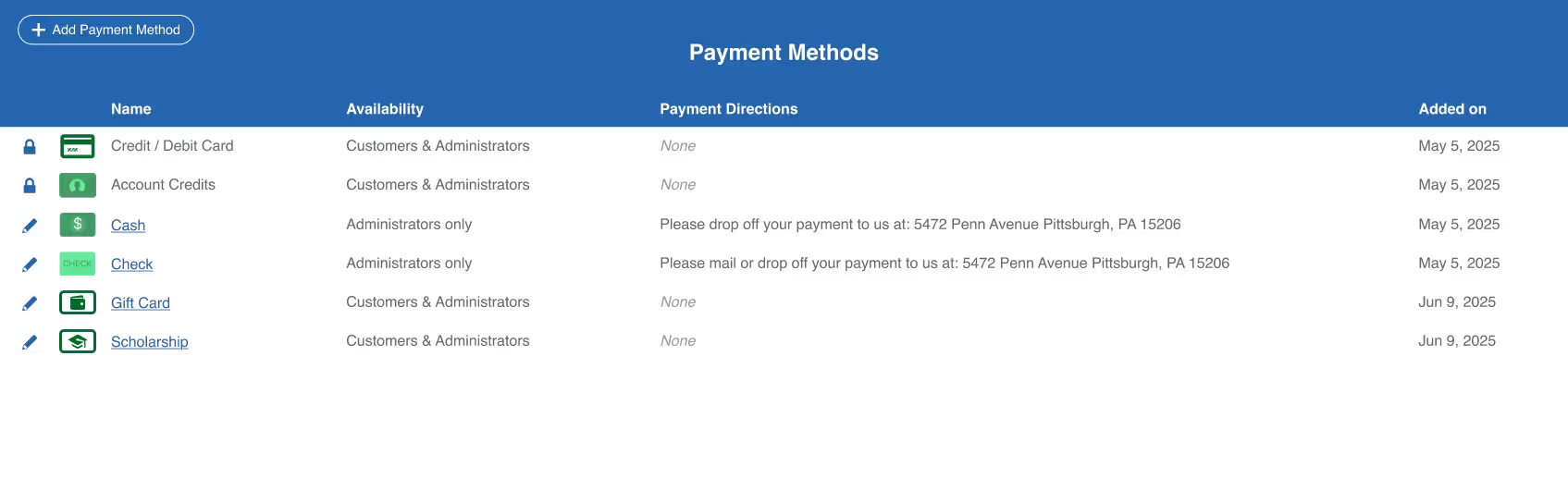
Payment plans for higher-cost offerings
For organizations offering higher-priced intensives, workshops, and camps, payment plans can make those offerings more accessible and help increase enrollment. But managing payment plans without the right infrastructure can mean hours in spreadsheets and chasing payments.
With CourseStorm, payment plans are simple and automated. Admins can set a deposit amount and decide on the payment schedule, whether custom or automated. If the latter, you simply decide the deposit amount up front and when you need full payment and the system with calculate and collect payments at regular intervals. For users, they can select "Pay over time" at check out and their credit or debit card with be charged automatically per the schedule. They will get an alert before a payment goes through and if their card fails, CourseStorm sends a message to them as well as the admin for follow-up.

As an added layer of visibility, admins can also see any overdue payment plans in a single view in the CourseStorm admin area.
Account Credits for refund and payment flexibility
Have you ever had a student cancel late and wished you could put money on their account without issuing a refund? Or maybe you have gift card or scholarship balances that you'd like students to use when they register for classes? With CourseStorm Account Credits, you can maintain credit balances on file for each of your students, allowing them to pull from those funds when they register for classes. You can also refund to account credits that a student can use for a later purchase, allowing you to retain those funds.
.avif)
Finally, you can use this feature to maintain any number of balances for your students (such as gift cards and scholarships), name them whatever you want and we'll track it all. Not only do we track balances, but we'll distinctly mark every penny paid against a registration by the payment method that was used, simplifying your accounting, too!
Accounting Rules for clean financial reporting
Accounting for nonprofit education programs is often complex and unique to each organization, which means your class registration software needs to offer as much flexibility as possible to work within your system. CourseStorm's Accounting Rules streamline monthly accounting, particularly when it comes to collecting many types of revenue: classes, materials, add-ons, etc.
Using Accounting Rules, your finance team can set up rules to direct revenue you receive into different General Ledger Accounts or even add accounting tags for finer grained reporting. So rather than trying to bridge data between multiple reports with pivot tables or other Excel hacks, you can see everything exactly as you want it in a payout export.
You can use rules like:
- "Put class revenue from classes in the Youth Camps category into the Summer Camps general ledger account"
- "Label class revenue from the Summer 2025 catalog with the Summer tag"
- "Put revenue from the ‘Do you want to add clay to your order?’ add-on into the Materials general ledger account"
Key Feature 3: Membership to support stronger patron relationships
For most arts nonprofits, education is one (important) part of a broader patron relationship. The same patron might buy a ticket, make a donation, attend a fundraiser, register their kids for camp, take an adult workshop, become a member... Your registration software should support that full relationship through features and integrations (more on that later).
CourseStorm’s Membership feature helps organizations manage membership status and offer members discounted classes—a common, popular membership benefit. Patrons can also purchase a membership through CourseStorm while they're signing up for a class. That means someone can register for a workshop, become a member, and receive the membership discount in the same purchase flow.
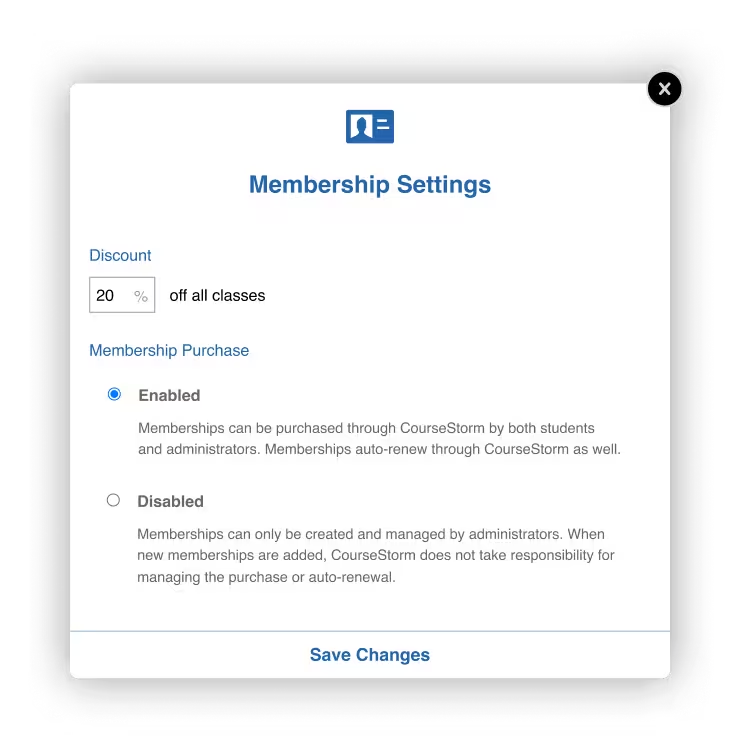
Pairing class registration and membership purchase supports both enrollment and member growth. It also makes the experience easier for your community because they don't have to complete separate transactions in separate places.
Key Feature 4: Automatic email marketing that helps fill seats
Most arts education programs want to grow enrollment. But with lean teams and a lot of different promotional priorities, it can be tough to find time to do the marketing work.
In an ideal world, staff could send every student a personal recommendation based on what classes they've have taken before. A student who took a watercolor class would hear about the next watercolor workshop. A parent that registered their child for theatre camp would learn about the next youth performance program.
But building lists, writing custom emails, and sending segmented campaigns takes time that busy ed teams often don't have.
CourseStorm’s automated marketing tools take care of that for you.
CourseStorm will automatically send personalized class recommendations based on a student’s past registration history and the classes you have available. The goal is to surface relevant opportunities to community members without asking staff to manually build lists and send one-off campaigns.
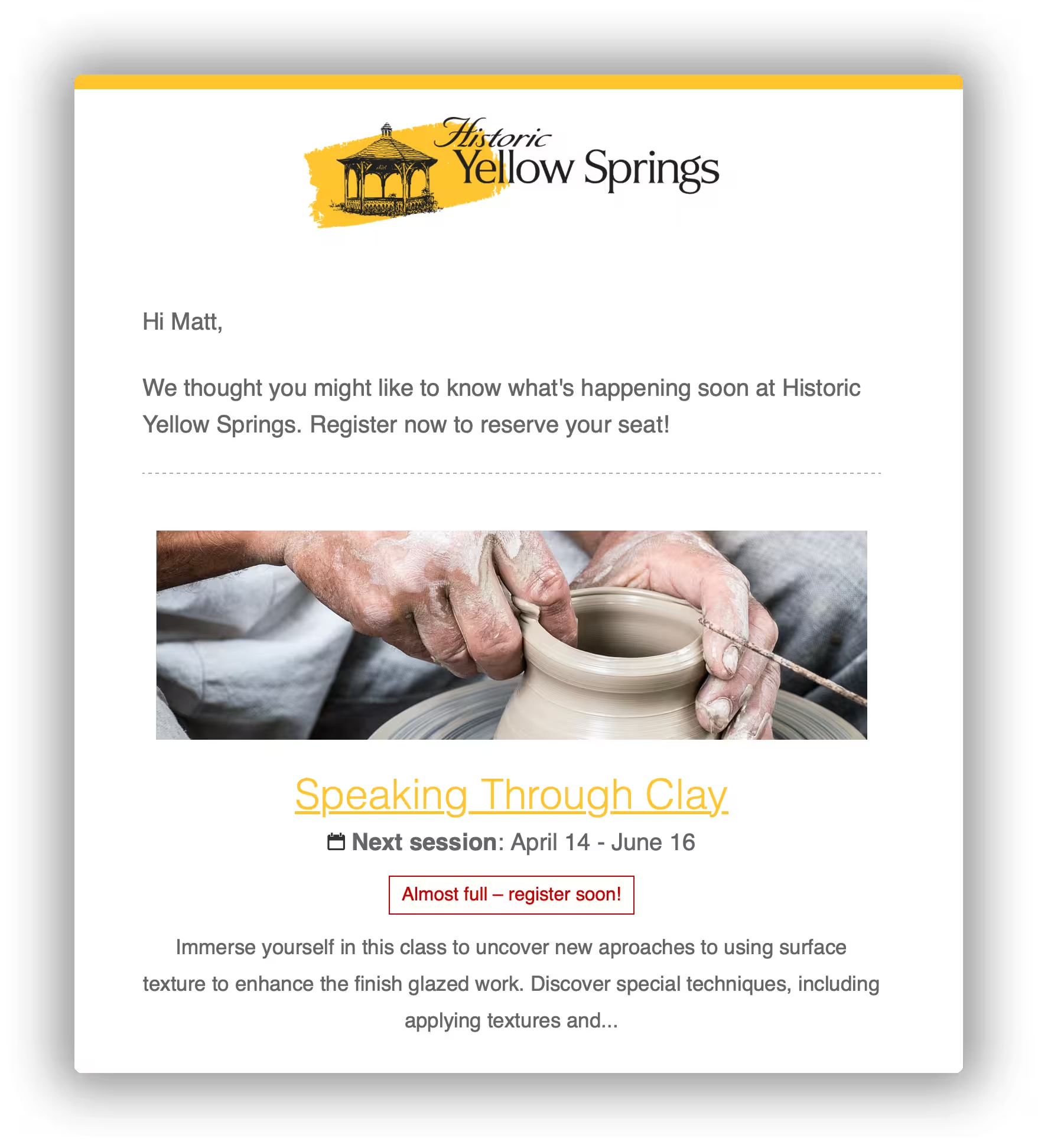
CourseStorm also offers simple growth tools like abandoned order notifications and low enrollment warnings.
Low enrollment notifications help when a class is close to meeting its minimum enrollment but at risk of cancelation. CourseStorm will notify staff, instructors, and registered students so everyone has a chance to help spread the word before the class is canceled.
These tools help arts nonprofits fill more seats without adding more work to the team’s plate. In fact, CourseStorm customers see an average +18% growth in their first year with CourseStorm, in large part due to these features.
Key Feature 5: Integrations with donor and ticketing platforms for a complete view of customers’ activity
Your education program isn't running in isolation; it's a part of your broader organization. In the same way, your class registration software needs to connect to your other core technologies, like your donor management or ticketing software. CourseStorm is designed to connect seamlessly with the tools arts nonprofits use everyday through direct integrations, Zapier connections, and our custom API.
Little Green Light Integration
Little Green Light (LGL) is a donor management software that helps nonprofits improve fundraising and donor relationships. The Little Green Light-CourseStorm integration lets CourseStorm class registration data appear automatically in LGL. Use it to include learners in appeal campaigns, manage communications, and send invitations for special events.
Spektrix Integration
Spektrix is a complete ticketing and CRM system that supports the arts, culture, and live entertainment. The CourseStorm integration with Spektrix allows organizations to view and report on CourseStorm data within Spektrix, providing a holistic view of patrons' ticket purchases, donations, and class registrations—all in one place.
NeonOne Integration
NeonOne is a nonprofit CRM built to help organizations manage relationships and grow community. With a simple, Zapier-powered setup, the CourseStorm + NeonOne integration syncs class registrations and student activity with the Neon CRM to reduce manual work and maintain a complete view of patron activity.
PatronManager Integration
PatronManager is a ticketing, fundraising, and marketing solution designed for arts programs. It’s used by theaters, music venues, festival organizers, and others who need to manage events. The PatronManager-CourseStorm integration gives nonprofits a more detailed picture of their patron, participant, and donor base.
Other Useful Integrations for Nonprofits
Integrations with other software solutions streamline data management so staff and volunteers can spend more time moving the mission forward. CourseStorm integrates with WordPress using a custom plugin, and with Mailchimp, Google Suite, and other essential tools through Zapier.
Key Feature 6: The support you need to get up to speed quickly and train your staff
The right class registration for nonprofits is easy to use and requires minimal training. You want something that volunteers and staff members alike can quickly get comfortable with. That way you can spend less time training and more time serving participants.
A good class registration software streamlines the training process to simplify the user experience. CourseStorm offers a comprehensive Help Site. Get answers to your questions 24/7/365 from our help articles and videos. We also offer email and phone support for certain plans. All customers have access to onboarding videos.

Eliminate up to 80% of your time spent on administrative tasks
By now, we hope you have all the details you need to make an informed decision. The right software can make a big difference for your nonprofit’s education program. It can simplify the work of staff and volunteers while creating positive experiences for participants.
We designed CourseStorm as the streamlined and simple solution for community, arts, and nonprofit organizations. But you don’t have to take our word for it. Get your free CourseStorm demo today and see for yourself why so many nonprofits have chosen CourseStorm.

Save time and grow your impact with CourseStorm

