
New Feature: Membership Purchase & Early Enrollment


Families can now buy memberships alongside classes in CourseStorm and enroll early
Memberships in CourseStorm keep getting better and better.
We first launched the Membership feature in early 2026, allowing our customers to manage membership status for their students and ensure that member students would get the appropriate discounts on classes during checkout. Our goal was to lay the foundation for what we knew were other updates to come.
With subsequent releases, we've added the next most important updates for our customers:
- The ability for patrons to purchase memberships alongside classes right in CourseStorm
- The ability for admins to give active members first access to classes
- The ability to manage membership auto-renewals
Membership Purchase: How does it work?
Visitors to your CourseStorm site will see a new link in the top right corner of the page inviting them to Become a Member.
When they click on this link, they'll see all of your membership packages listed along with a photo, price, and a description of the benefits they'll receive with their purchase.
.png)
They can add any of these memberships to their cart right alongside any classes they'd like to purchase. And they'll also receive the appropriate discount for these classes even if they're in the same cart as a new membership.
As with all other orders, you'll get an email as soon as the purchase goes through. You don't have to lift a finger.
Now available: Auto-Renewal and Reminders
Every membership purchased through CourseStorm is set up to auto-renew, so you don't have to keep track of who is active, inactive, or has upcoming renewals. We'll email the student two weeks before their membership expires to let them know of the upcoming charge and if the payment fails for any reason, you'll both be notified so that you can collect payment via other means.
.png)
Membership Early Enrollment: How does it work?
Early enrollment gives active members first access to classes through a simple Membership setting. Admins can choose how many days before the public its members can register.
Then, CourseStorm will show when enrollment opens for members and the public in the CourseStorm catalog, and automatically check membership eligibility during registration.
.avif)
Availability
All Membership features are now available to all customers who have enabled the membership feature on our Pro or All Access plans!
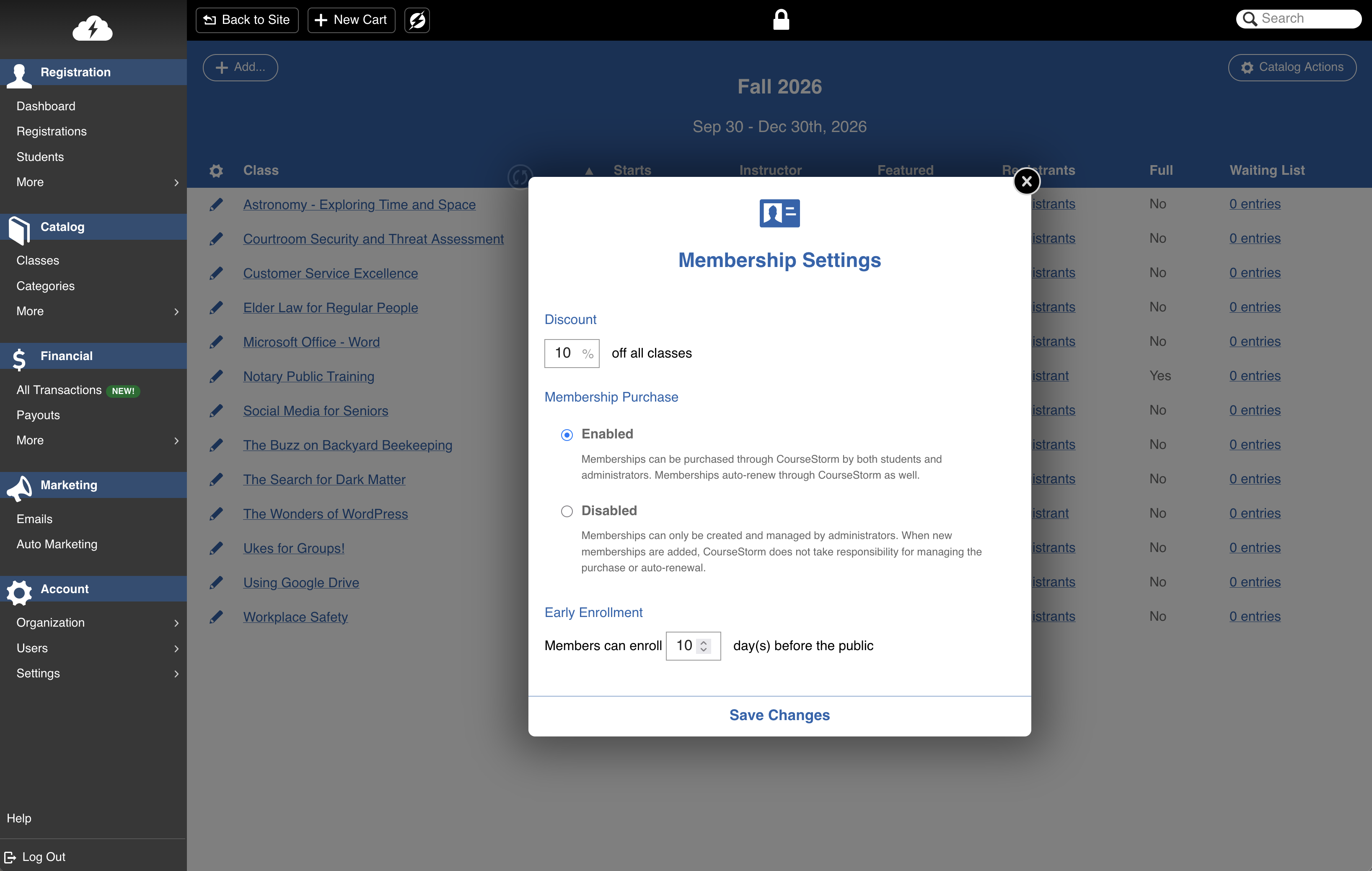
Just go to Membership Settings in your administration area and select the option to enable Membership Purchase. Then, make sure to update your membership packages with photos, prices, and benefits so that registrants have everything they need to make a purchase. If you want to offer early enrollment to members, this is also where you can choose how many days in advance you'd like to open classes to members before opening to the general public.
Thank You
A big thank you goes out to:
- ARTFactory
- Woodstock Arts
- Pittsburgh Glass Center
- and all other customers who requested this feature!
And a special thank you to team members Grant Howard, Ethan Schwelling, Kat Canavan, and Cory Langenbach who took the lead on this project!



Save time and grow your impact with CourseStorm

