
6 Email Templates to Boost Student Engagement (+SMS and AI tips)



Email is one of the most reliable ways to reach your community. Families and adult learners rely on their inboxes for schedules, reminders, and program updates. Your messages keep them in the loop and excited for what’s to come. A 2025 MailerLite survey shows email open rates for nonprofits, educational institutions, art galleries, museums, and hobby organizations sitting at around 45 percent or higher.
The tricky part is everything it takes to keep those messages flowing. Registrations, donor activity, and event attendance often live in separate systems. Add newer tools like SMS and AI to the mix and it gets even harder to figure out what to send, when, and where.
That’s where solid email templates come in. They cut through the second-guessing, strengthen student engagement, and ease the pressure on your team. The templates ahead work for the real scenarios arts organizations face every day, with ideas for weaving in SMS and simple AI prompts to make each message even stronger. Read on or download the full package of program communication email templates.
Best practices for emailing students
Feel free to copy, paste, and customize the templates below to best fit your program and your students. We’ve included brackets to show you where to add relevant course or program information.
Double-brackets are a signal that information can (and should!) be customized for each student. Personalizing student information shows students you care about them as individuals and makes them more likely to engage.
All of this customization and personalization doesn’t have to be difficult. You can automate a lot of it using mail merge and email marketing tools.
1. Class recommendation emails
Your students are constantly telling you what they’re interested in. Every class they take, workshop they return to, or performance they attend is another clue. Using that information strategically will make your emails more relevant and drive repeat sign-ups.
If you have CourseStorm, you can simply turn on automated class recommendations and let our software take care of this for you. The system reviews each student’s past registrations and surfaces upcoming classes that match their interests. Set it once and let it work in the background.
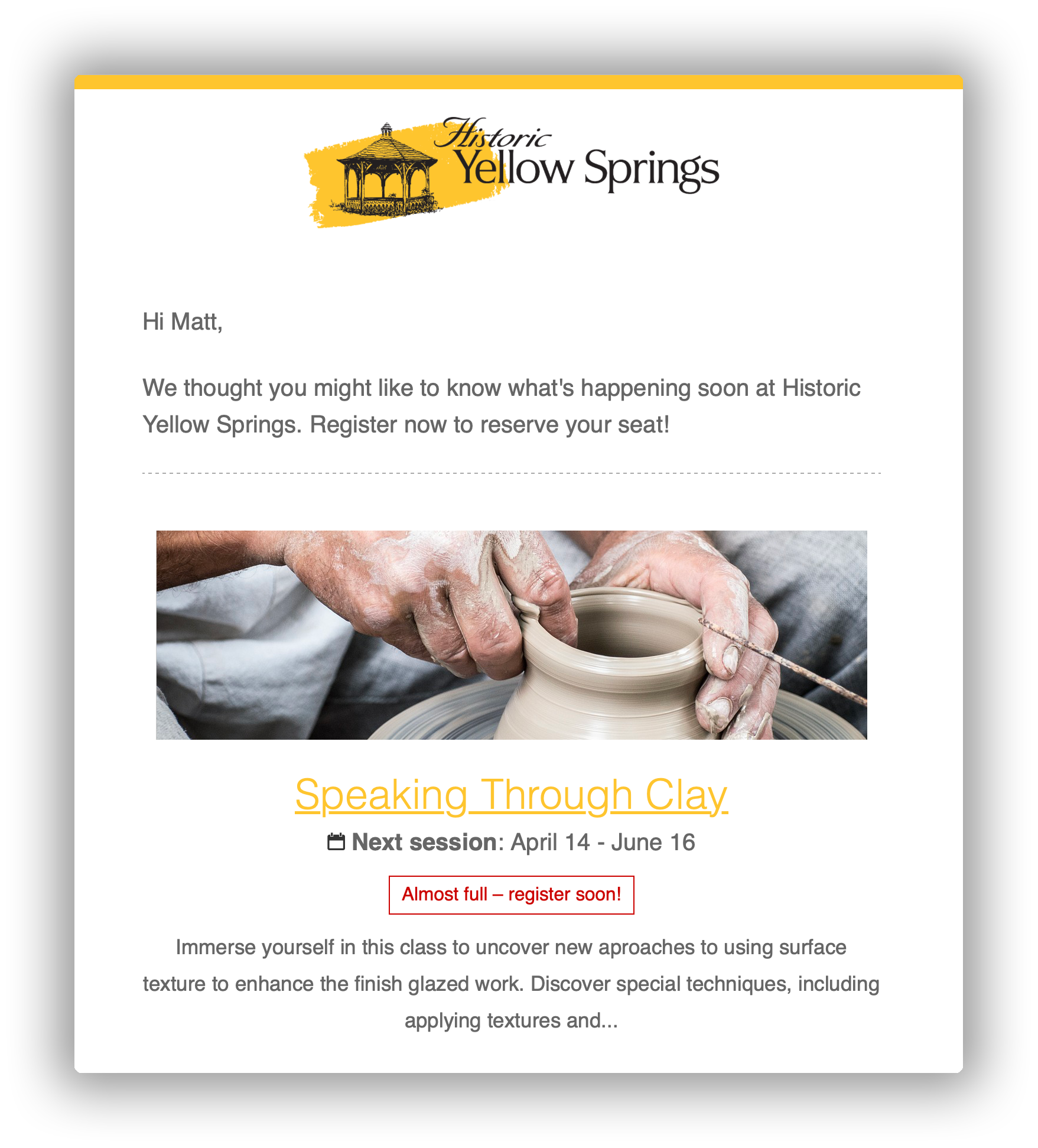
For programs that aren’t using CourseStorm, class recommendation emails are a little more labor intensive, but they may be worth the effort.
Start with a short list of classes you want to promote. Look at recent class rosters and identify students who have taken related courses or shown interest in similar areas. Then, send each group a tailored invitation that highlights why the new class is a natural next step.
A well-timed recommendation often becomes the nudge someone needs to try their next class. In fact, we’ve found that about 10% of students who get class recommendation emails click on the links inside. That could lead to dozens of extra enrollments for your courses.
Class recommendation email template
You can send this email to any student who has taken at least one class with you. Limit recommendation emails to no more than once a week and make sure they’re relevant to that student’s interests as you understand them.
Suggested subject lines:
- Keep Learning About [Subject]
- New classes we picked just for you
- Keep learning with us
Hi [[Student first name]],
We have a few upcoming classes that we think you'll really enjoy based on what you’ve taken with us before.
[Course Title]
[Dates]
[Short one-line description if available]
[Registration link]
Curious about what else is coming up? Check out our complete catalog.—hyperlink to course catalog
Thanks for being part of our community,
[Program director/admin]
2. Re-engagement emails
Students step away for all kinds of reasons. Life gets busy, schedules change. Sometimes all students need is a nudge to bring them back to your program. If a student hasn’t enrolled in three months or more, try sending a re-engagement email to reconnect with lapsed students.
Here’s how to find the students who haven’t enrolled in a while:
- Export your entire student list from your registration software.
- Export a list of students who enrolled in your last session or during the last few months.
- Use a filter or query to identify the students who are on the first list but not the second list.
The result will be students who are good candidates for a re-engagement email. Pay attention to factors like the class subject, age group, or the time of year they usually participate, and use these details to craft a more personal message.
From there, invite them back with intention. Highlight a class connected to what they’ve taken before or a new offering that aligns with their interests. Also consider adding a small incentive, such as an early-bird registration window or a limited-time promo code, to add urgency.
Re-engagement email template
Suggested subject lines:
- A few classes you might love
- Ready to jump back in?
- New offerings that match your interests
-
Hi [[Student first name]],
t’s been a little while since your last class with us, and we’d love to welcome you back. Based on what you’ve taken before, here are a few upcoming classes that might be a great fit:
[Course Title 1]
[Dates]
[Short one-line description if available]
[Registration link]
[Course Title 2]
[Dates]
[Short one-line description if available]
[Registration link]
[Course Title 3]
[Dates]
[Short one-line description if available]
[Registration link]
You can explore everything we have coming up in our full catalog.— hyperlink to course catalog
We hope to see you again soon,
[Program director/admin]
P.S. If there’s something that would make it easier for you to participate, reply and let us know. We’re always open to hearing your feedback and ideas.
3. Capacity and enrollment warning emails
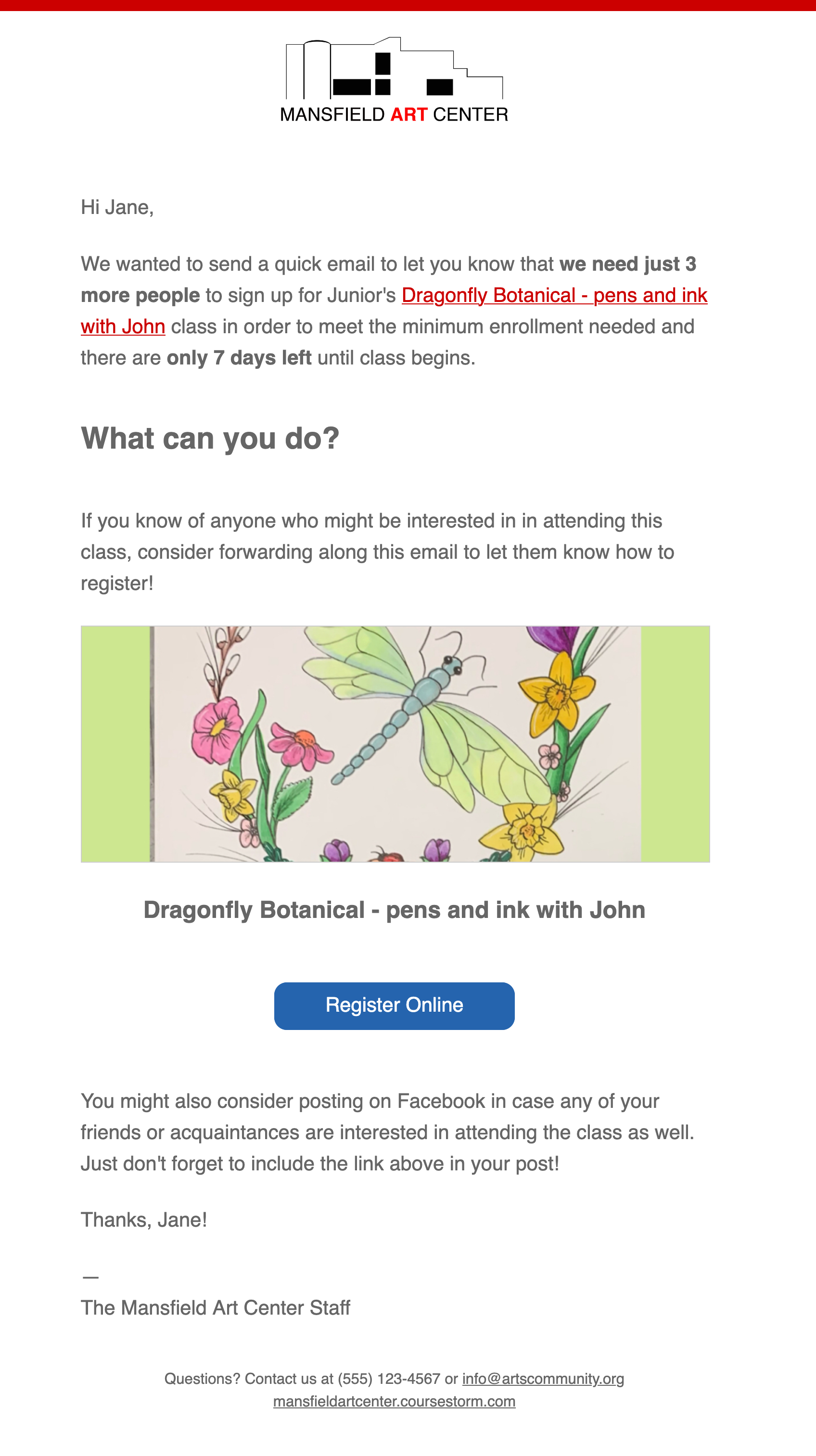
Think of enrollment warning emails as targeted news bulletins. They share a single piece of timely and relevant information. Ideally, learning this news will spur students to take action.
There are two types of enrollment warning emails:
- The class is in danger of being canceled
- This class is almost full!
Pro tip: CourseStorm users can turn on automatic enrollment warning emails.
One customer, Springfield Little Theatre, shares:
“Our enrollment has been steadily increasing and we really attribute some of that to the automatic marketing emails. That’s a feature we love because it gets the word out there and we don’t have to think about it.”
Connect with our team for more information and to see CourseStorm in action.
Enrollment warning email template 1: Cancelation danger
Send this email to students who have already signed up for the class that is in danger of being canceled. For programs that aren’t using CourseStorm, manually sending these emails can help you drive additional signups and prevent cancellation.
Suggested subject lines:
- Urgent info about [[class title]]
- Update about your upcoming class
- Help make sure [[class title]] runs
Hi [[Student first name]],
We hope you’re looking forward to [class title] on [date]. However, the class still needs [#] more students to run as planned.
You can help by inviting a friend or family member to attend the class with you. It’s a fun way to spend time together and it helps keep programs like this in our community. [We're including this promo code so that a friend can register for XX% off]
Here’s the registration link to share: [registration link]
You can also share a post on social media to help spread the word even further.
Thank you so much! We look forward to seeing you in class soon.
Warmly,
[Instructor or program manager name]
Enrollment warning email template 2: Almost full
Full classes offer the best return on investment. Since the class is running anyway, adding a few more students doesn’t add much to the overall cost. Sending an “almost full” email can be a quick money maker for your program.
Besides, letting students know when a class is almost full is a nice courtesy gesture. It can encourage prospective students to take action. A course that’s almost full is one that’s popular, and choosing the popular option can make people feel like they’ve made a good decision. You can send this email to any student who has expressed interest in the class subject.
Suggested subject lines:
- Don't wait! Class almost full
- Just a few seats left in [class name]
- Last chance to join us
Hi [[Student first name]],
There are just [#] seats left in [course name]. Don’t miss your chance to take one of our most popular classes.
[Course title]
[Short description or key outcomes]
[Dates / times]
[Registration link]
If this sounds like a class you’d like, sign up today!
Hope to see you there,
[Instructor or program manager name]
4. Expectations and orientation email
Help students prepare for their first day with a warm but informative expectations and orientation email. It can reiterate some of the information already included in the course catalog and add more details to ensure a student's first class goes smoothly.
For a ceramics class, you might need students to wear certain clothes that can get a little dirty. A dance class probably requires particular clothing and footwear. If you're running a kids' camp, you may want guardians to check their child in in person on the first day.
Keep in mind that students may have registered weeks before the class actually starts. An expectations and orientation email is your opportunity to refresh their memory on the details of the class. It also serves as a handy reminder to the student that they have a class to attend!
Expectations and orientation email template
Pro tip: This email might be best received if it comes directly from the instructor. This helps students start building a relationship with their instructors even before the first class. With CourseStorm, program admins can grant instructors' access to their student rosters and enable some student communication. Learn more here.
Suggested subject lines:
- Get ready for [Class name]
- Your first class is coming up
- What to expect in [Class name]
Hi [[Student first name]],
[[class name]] starts in just one week. I hope you’re as excited as I am. Here are a few details to help you prepare for our first class.
When and where
[Location] at [[time]
Please plan to arrive [ten minutes early / on time].
What to bring
[List of materials, clothing notes, equipment, or reminders]
If you have any accessibility needs or questions about materials, don't hesitate to reach out.
Before we begin
Please take a moment to review our class policies [hyperlink to policies] so you know what to expect.
A bit about me
My name is [[instructor name]], and I [[short bio or one line about teaching style]]. I’m here to make this a supportive and enjoyable experience.
If anything comes up before class, send me an email. I’m happy to help.
Looking forward to seeing you,
[Instructor name]
5. Feedback and retention email
Gathering (and acting on) feedback is one of the easiest ways to improve your programs and strengthen long-term student engagement. A quick email after a class ends can surface helpful insights, stories to share with your community, and data to support reporting and improvements. It also shows students that their experience matters, which makes them more likely to return.
Here are a few ways to collect useful feedback via email:
- Send a short survey with a few focused questions
- Invite a quick reply with open-ended reflections
- Ask for a public review if you’re building social proof for your classes
No matter how you formulate your request, focus on using a genuine tone and making sure it's a light lift for participants.
Review request email template
Social proof — testimonials or reviews from real people — can help prospective students feel confident in choosing your program. You can ask students to leave a review on Google, Facebook or anywhere else reviews can be posted.
Suggested subject lines:
- How was your class?
- Share your experience
- We'd love your thoughts
Hi [[Student first name]],
Thank you for joining us for [course name] on [date]. We hope you enjoyed your experience. Would you be willing to write a review about your experience?
Your insights help other students feel confident signing up for our programs and supports our team as we plan future classes.
You can share a review here: [review link]
Thank you so much!
[Program director or admin]
Feedback survey email template
Suggested subject lines:
- Share your thoughts
- Quick survey about your class
- We'd love your feedback
Hi [[Student first name]],
Thank you for joining us for [class name] on [date]. We hope you enjoyed your class. Would you be willing to tell us about your experience?
This [X]-question survey takes just a few minutes and your input helps us understand what worked well and where we can improve so we can better serve learners like you!
Share your feedback here: [Survey link/button]
Thank you for taking a few minutes to support our program!
[Program director or admin]
6. Fundraising email
Your classes and camps can create truly meaningful connections between your community and your organization. Education often engages full families and learning can be more connective than live performance, helping people uncover new passions and develop core skills. This makes your education program a natural entry point for long-term support.
A thoughtful fundraising email builds on that connection without making the request feel abrupt or transactional.
It should:
- Acknowledge the learning experience
- Name the impact their gift will help make possible
- Invite support that keeps programs accessible to others
Leverage segmentation to customize the request further. A parent whose child just completed a youth class will respond differently from an adult learner who takes workshops every season. Also, consider tailoring your message to the recipient’s giving history, whether they’re a past donor, a lapsed donor, or someone considering their first gift.
Fundraising email template
Use the template below as your base message. Swap in one of the donor-specific lines to match the person you’re emailing (e.g., monthly donors, lapsed donors, one-time donors, subscribers, major donors) to make the fundraising ask more relevant to their relationship with your organization.
Suggested subject lines:
- A quick note about the impact you made
- You helped make this possible
- Your support keeps classes accessible
Hi [[Participant first name]],
Thank you again for being part of [class name] this [season]. Everyday, we're reminded how much this program means to this community. It gives people room to try something new, build confidence, and connect with others who share their interests.
[Insert donor-specific ask line here]
Your support covers [brief description of impact: supplies, teaching artists, scholarships, studio costs, community outreach, etc.]
[Donation link]
Every contribution, no matter the size, strengthens our education program and ensures more students can experience the joy of learning here.
Thank you for being part of this community,
[[Program director or development director name]]
Donor-specific ask lines
- Monthly donors: “As one of our most consistent supporters, your ongoing generosity makes a real difference. If you’d like to make an additional one-time gift toward this session’s programs, here’s the link.”
- Lapsed donors: “Your past support helped keep these classes thriving. If you’re able to renew your gift this season, we would be grateful.”
- One-time donors: “If our programs continue to be meaningful for you, this is a great moment to consider becoming a monthly donor.”
- Non-donors/subscribers: “If this class made an impact on you, this is a great moment to make your first gift. Every contribution helps open the door for another student.”
- Major donors: “Your generosity makes opportunities like this possible for so many people. Thank you for considering a contribution toward this season’s education initiatives.”
Bonus: SMS communication
SMS alerts help you reach students with timely updates they won’t miss. A 2025 EZ Texting Consumer Behavior Report found that SMS marketing boasts a 98% open rate and 84% of customers respond within 15 minutes.
That kind of immediacy makes SMS ideal for the moments when timing really matters. SMS doesn’t replace email, but it complements it by removing friction and keeping your classes on track.
Here are a few best practices to keep texting helpful and respectful:
- Get clear opt-in consent, and make opting out simple.
- Keep messages short and personal. First names and class context go a long way.
- Use SMS for time-sensitive updates. Save the longer details for email.
- Watch your timing and frequency. Experts recommend starting with four to eight messages a month, then adjusting based on your engagement rates. If replies or click-throughs drop, you may be sending too often or at the wrong times.
- Use CourseStorm’s built-in SMS tools. Enable text reminders so students automatically receive SMS updates when they’ve provided a text-capable number. CourseStorm also integrates with SMS providers like Mobile Message and Zapier if you want to connect with external messaging platforms.
SMS alert templates
Waitlist opening
Hi [[name]], good news:
A spot just opened up in [[class title]].
Register here if you’d like to join: [[link]]
Reply STOP to opt out.
Weather cancellation
Hi [[name]], update for today:
[[Class title]] is canceled due to the weather.
We’ll email you shortly with next steps.
Reply STOP to opt out.
“Class Starts Today”
Hi [[name]], quick reminder:
[[Class title]] starts today at [[time]] at [[location]].
See you soon!
Reply STOP to opt out.
How to personalize your email templates with AI
The templates in this guide are a strong starting point. But with the right prompts, AI can help you personalize emails at scale without adding more work to your plate.
Start by pulling in the details you already track:
- Age segment: youth, teen, adult, senior
- Preferred channel: email-first, SMS-first
- CRM tags: first-time registrant, returning student, scholarship recipient
- Donation history: past donor, lapsed donor, monthly supporter
- Attendance patterns: hasn’t enrolled in six months, frequent participant, waitlisted often
- Current offerings: available and upcoming classes and camps to promote
Then, include these details in your prompt so your LLM of choice can adapt the template to match the student’s history, interests, and communication preferences.
Here are a few prompt examples to try:
- Class Recommendation: “Personalize this class recommendation template for an adult ceramics student who took a beginner class last fall. Suggest two intermediate options.”
- Re-engagement: “Adapt this re-engagement email for a parent whose child hasn’t enrolled in six months but loves theater classes.”
- Orientation: “Personalize this orientation email for a first-time watercolor student. Include arrival details and what to bring.”
- Fundraising: “Tailor this fundraising email for a lapsed donor who recently attended a photography workshop.”
Our advice? Treat AI as a drafting partner, not an autopilot. It won’t know your preferred tone, voice, age groups, program structures, or audience unless you tell it. The more specific your prompt, the better the output.
The right message at the right time
The messages you send help students move through your program with fewer hiccups. A quick reminder helps them walk in with what they need. A follow-up email after class nudges them to explore something new. A fast text about a room change saves you from a dozen “Where do I go?” calls. These small moments keep everything running a little steadier.
CourseStorm makes this easier to manage. Your rosters, tags, and messages all live in one spot, so you can easily see what’s happening and respond without bouncing between systems.
Want more support? Browse our full email template package for ready-to-use language. You can also book a free demo to see how CourseStorm can help your team communicate clearly at every step.

Save time and grow your impact with CourseStorm

